A BETTER UNDERSTANDING ON WHAT AI (ARTIFICIAL INTELLIGENCE) IS |
|
AI (Artificial Intelligence) is quickly becoming one of the most important technological advancements currently being made. Influencing industries ranging from healthcare and finance to transportation and entertainment. But what exactly really is AI, and how does it work? Let’s dive into the core concepts behind AI and discover how it functions in different applications. What is AI (Artificial Intelligence)? The core function of, AI (Artificial Intelligence) refers to the ability of machines to mimic human intelligence. AI allows computers and systems to perform tasks that would typically require human intelligence, such as understanding language, recognizing patterns, solving problems, and making decisions. Understanding the levels of AI There are different levels of AI, typically categorized as follows:
How AI Functions: Key Components and Techniques AI is built upon several key technologies and concepts, each contributing to the way it functions. Here’s a breakdown of the main elements of AI and how they come together: 1. Machine Learning (ML) Machine Learning (ML) is a subset of AI that allows systems to learn and improve from experience without being explicitly programmed. Instead of following predetermined rules, ML algorithms use large datasets to identify patterns and make predictions. Machine learning systems are trained on data, learn from it, and can then make decisions or predictions based on what they have learned.
|
How it works:
For example, in email spam filtering, a machine learning model is trained on a dataset of labeled emails (spam or not spam). Over time, it learns to detect patterns associated with spam and non-spam emails, improving its ability to sort incoming messages correctly. 2. Deep Learning Deep Learning is a specialized branch of machine learning that uses neural networks, which are inspired by the structure of the human brain. Neural networks consist of layers of nodes (neurons) that process data and learn increasingly complex features at each layer. Deep learning has enabled breakthroughs in areas like image recognition, natural language processing, and voice assistants. How it works:
For instance, in facial recognition, a deep learning model is trained on a dataset of faces. The neural network gradually learns to recognize key facial features (like eyes, nose, and mouth), allowing it to identify individuals with high accuracy. 3. Natural Language Processing (NLP) Natural Language Processing (NLP) is a branch of AI that focuses on enabling computers to understand, interpret, and generate human language. NLP is used in applications like chatbots, virtual assistants, and language translation services. |
How it works:
For example, when you use a virtual assistant like Siri or Google Assistant, NLP is at work. The system processes your voice commands, interprets the meaning, and provides a response or action based on your request. 4. Computer Vision Computer Vision enables machines to interpret and understand visual information from the world, such as images or videos. By using algorithms to analyze pixels and detect patterns, AI systems can "see" and make decisions based on visual input. This technology is crucial for applications like self-driving cars, medical imaging, and security systems. How it works:
A self-driving car, for example, uses computer vision to interpret its surroundings. The AI processes video data from cameras and sensors to detect pedestrians, other vehicles, traffic signals, and road markings, allowing the car to navigate safely. How AI Is Applied in Real Life AI is deeply integrated into everyday life and business, powering everything from routine tasks to groundbreaking innovations. Its influence continues to expand across nearly every major industry.
|
Finance: In the financial sector, AI is used to monitor real-time transactions and detect fraud within milliseconds. Banks deploy AI driven risk assessment tools to evaluate loan applications and creditworthiness more accurately, while investment firms use predictive algorithms to forecast market trends and manage portfolios. Generative AI tools are also being used by analysts to summarize market data and automate reporting, improving decision-making speed and reducing human error.
Retail: Retailers are using AI to transform how consumers shop, both online and in stores. Recommendation systems powered by deep learning — like those used by Amazon and Shopify — predict what customers are likely to buy next based on browsing history, preferences, and even visual cues. AI-driven inventory management tools forecast demand more accurately, reducing waste and supply chain delays. In physical stores, smart checkout systems powered by computer vision, such as Amazon Go, allow shoppers to pick up items and leave without waiting in line, with AI automatically charging their account. Transportation: The transportation industry is being reshaped by AI technologies that improve safety, efficiency, and sustainability. Autonomous vehicles from companies like Tesla, Waymo, and Cruise use a combination of computer vision, machine learning, and real-time sensor data to navigate complex traffic conditions safely. AI also powers intelligent traffic control systems in major cities, reducing congestion and optimizing traffic flow. Customer Service: AI-driven chatbots and virtual assistants have become essential in improving customer support experiences. Modern AI agents can understand natural language, detect emotion, and resolve complex queries without human intervention. Businesses use platforms like ChatGPT Enterprise and Microsoft Copilot to handle customer inquiries, automate bookings, and even offer personalized recommendations. AI surrounds us daily, learning more about how it functions can increase the benefits you can gain by using AI in your daily life |
 |
Artificial Intelligence (AI) is revolutionizing industries like healthcare, finance, retail, and transportation by enabling machines to perform tasks that once required human intelligence. It works through technologies such as machine learning, deep learning, natural language processing, and computer vision, allowing systems to learn, adapt, and make decisions. From diagnosing diseases and powering self-driving cars to detecting fraud and running chatbots, AI is deeply integrated into daily life. As it advances, understanding how AI works is key to using it effectively and responsibly. |
 Click Here to View a Short Video!
SPOTTING A PHISHING EMAIL WITH KEY ASPECTS |
|
How to Recognize a Phishing Email: Key Red Flags Phishing emails are fraudulent messages crafted to trick you into sharing sensitive information such as passwords, credit card details, or personal data. Cybercriminals often disguise these emails to look like legitimate communications from trusted organizations. Here are the main warning signs to watch for when spotting a phishing attempt: 1. Impersonal or Generic Greetings: Phishing messages frequently begin with vague greetings like “Dear Customer” or “Dear User” instead of addressing you by name. Authentic businesses usually personalize their emails and include details that confirm your identity or relationship with them. 2. Urgent or Threatening Language: Scammers often use fear and urgency to pressure you into acting quickly. Common tactics include claims that your account will be closed, your payment failed, or your security has been compromised. If an email demands immediate action, take a step back and verify its legitimacy first. |
3. Suspicious or Misspelled Sender Addresses: Always check the sender’s email address carefully. Phishing emails often mimic real addresses with subtle differences—such as “support@amzon.com” instead of “support@amazon.com.” Even one extra character or number can indicate a fake sender.
4. Unfamiliar Attachments or Questionable Links: Be cautious with emails containing attachments or links you weren’t expecting. Hover your cursor over any link (without clicking) to preview the URL. If the address looks strange or doesn’t match the official company domain, avoid clicking—it could lead to a malicious website or download. 5. Requests for Private or Financial Information:Legitimate organizations will never ask you to confirm personal details, passwords, or financial information via email. Any message requesting sensitive data should be treated as suspicious and reported immediately 6. Poor Grammar and Awkward Wording Many phishing attempts contain spelling errors, inconsistent formatting, or unusual phrasing. Reputable companies take care to send professional, polished communications —so if the writing seems off, it’s likely a scam.
|
MOBILE MALWARE TRAPS |
|
Mobile malware is often overlooked. People focus on securing their laptops or desktops without paying close attention to smartphone and tablet security. Mobile malware can arrive in various forms, from sneaky apps to deceptive links. Ignorance is not bliss here. Understanding the common traps is your first line of defense.
|
Any reputable company or site will never message you asking for your personal info without you requesting it beforehand.
Knowing these common types of mobile malware can save you from falling victim in the future.
|
KEEP YOUR INBOX ORGANIZED: WHAT IS GRAYMAIL? |
| In today’s digital age, email clutter is a common problem, with many inboxes flooded by an overwhelming mix of messages.
Among the emails that pile up are those known as graymail. These messages fall into a gray area between useful communication and outright spam. But what exactly is graymail, and how can you take control of your inbox by managing it more effectively? What is Graymail? Graymail refers to emails that are legitimate but unwanted by the recipient. These are emails you subscribed to at some point, such as bulk newsletters, promotional offers, or notifications from businesses, but now no longer find useful. Unlike spam, graymail isn’t harmful or unsolicited; it’s simply no longer a priority for the user to read or is not relevant to the user’s interests anymore. Common Types of Graymail: Newsletters: You signed up for a brand’s newsletter but stopped reading them. Now they constantly send you emails that you continue to scroll past every time you access your email. Promotional Emails: Regular offers or deals from companies where you’ve previously made a purchase. These are typically emails you scroll past but everyone once in a while you might click on them causing you to feel torn between unsubscribing or continuing to receive emails that clog your inbox. Notifications:Alerts from services you use, such as social media updates or purchase receipts. These can be useful but the majority of the time you simply scroll right past emails of this nature. |
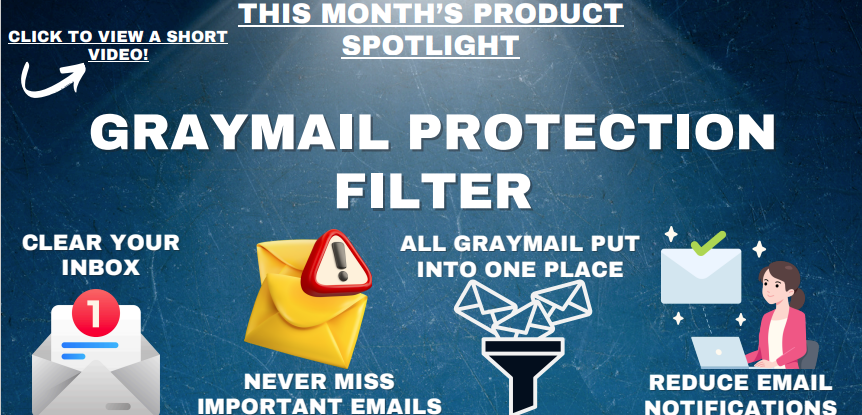
Graymail can clutter your inbox, causing important emails to get buried and making your inbox harder to manage. This is where having a Graymail Protection Filter can vastly improve your experience when checking your inbox. Our Graymail Protection Filter will collect data on all of the emails that your inbox receives and will automatically filter out all the emails that are graymail and drop them into a special graymail folder. This clears your inbox of messages that simply take up important space in your inbox and potentially lead to missing an important email due to a clogged inbox. Users who have Graymail Protection Filtering have reported improved productivity, less stress when going through their email inbox and a higher confidence that they will not miss an important email that accidently gets buried in emails we now know are considered graymail. Clear inboxes can dramatically change the way that you work. Graymail Protection Filtering allows you to have an organized inbox with the ability to still read your graymail emails at your own leisure without the risk of clogging your inbox. Ask us how to get Graymail Protection Filtering on your inbox today!
|

ARE YOU PROPERLY USING ALL THAT MICROSOFT 365 HAS TO OFFER? |
|
Microsoft 365 (M365) is an incredibly powerful suite of business tools—but many users only tap into a small portion of what it can do. By optimizing your settings and taking advantage of its built-in features, you can dramatically boost productivity, collaboration, and security across your organization. Here are some practical tips to help you get more from your Microsoft 365 business subscription: 1. Optimize Email with Outlook Set Up a Focused Inbox: Stay organized by separating high-priority messages from less important ones. The Focused Inbox automatically filters your email so you can focus on what matters most. Organize with Rules: Create customized rules to automatically move, flag, or mark emails as read. This reduces inbox clutter and ensures important messages are easy to find. 2. Enhance Collaboration with Microsoft Teams Create Channels for Organization: Keep conversations focused by creating dedicated channels for each team, department, or project. This makes it easier for everyone to find relevant discussions and files
|
Customize Notifications: Stay informed without getting overwhelmed. Go to Settings > Notifications to adjust alerts so you only receive what’s most important.
Use Tabs for Quick Access: Add tabs in Teams for frequently used files, websites, or apps. This allows your team to quickly access key resources without switching between tools. 3. Streamline Workflows with SharePoint Organize with Document Libraries: Use document libraries to neatly organize files by department, project, or client. This makes file management and collaboration much more efficient. Use Site Templates: Save time by creating new SharePoint sites from templates designed for common needs—like team sites, project hubs, or communication portals. 4. Maximize Productivity with OneDrive Sync Files for Offline Access: Access your files anytime—even without an internet connection. Syncing ensures your latest documents are always available, wherever you work. Use Version History: Restore previous versions of files quickly and easily. This feature is essential for recovering from accidental edits or ransomware attacks. |
5. Leverage Advanced Tools and Automation:
Automate Tasks with Power Automate: Eliminate repetitive tasks by setting up automated workflows. Power Automate lets you create flows to handle approvals, notifications, and data updates automatically. Visualize Data with Power BI: Turn your data into powerful insights. Connect Power BI to your M365 apps to build interactive dashboards and reports for better decision-making. Boost Productivity with Microsoft 365 Copilot: Copilot, Microsoft’s generative AI assistant, integrates across Word, Excel, Outlook, and Teams to help you write, analyze, and summarize information faster than ever. Why Microsoft 365 Is a Cost-Effective Solution for Businesses Beyond its powerful features and productivity tools, Microsoft 365 offers a significant cost advantage compared to managing multiple standalone software solutions. Many organizations spend more than they realize by subscribing to separate tools for communication, file sharing, security, and analytics. Microsoft 365 combines all of these capabilities into one unified ecosystem—reducing redundancy and improving overall efficiency. |
With a single subscription, businesses gain access to a complete suite that includes Outlook, Teams, Word, Excel, PowerPoint, SharePoint, OneDrive, Power BI, and now Microsoft Copilot.
This all-in-one approach eliminates the need for separate licenses for email hosting, cloud storage, and collaboration platforms like Zoom, Slack, or Dropbox, which can quickly add up in cost. Additionally, Microsoft 365’s built-in security and compliance tools—such as advanced threat protection, data loss prevention, and identity management— reduce the need for expensive third-party cybersecurity solutions. Its cloud-based model also minimizes hardware and maintenance costs while allowing for easy scalability as your business grows. By streamlining operations and consolidating tools under one platform, businesses can not only reduce expenses but also increase productivity and collaboration across teams. In short, Microsoft 365 doesn’t just enhance how your business works—it makes how you work more affordable, secure, and efficient. If you or your team need help setting up or learning these tools, we’re happy to assist—just let us know |
We Love ReferralsThe greatest gift anyone can give us is a referral to another business in need of IT services. Referrals help us keep costs down so we can pass the savings to our clients.If your referral ends up becoming a client - we’ll gift them their first month of service at no charge AND we’ll gift you a $500 Amazon Gift Voucher.Simply introduce me via email to stan@fcskc.com and I’ll take it from there. I personally promise we’ll look after your referral's business with a high level of care and attention (just like we do with all our clients).-Stan |
We Want Your FeedbackHere at Ferguson Computer Services, we value your feedback greatly and would appreciate if you took time from your busy schedule to leave us a review. These reviews let us know what we are doing well and what we might be able to improve on in the future.
|
Technology Trivia TimeTechnology Trivia Question of the Month! Send the correct answer to winner@fcskc.com to be entered to win a $50 gift card to Amazon.Here is October's question of the month:What is Machine Learning? |


 |
